Electronics, Computers & Accessories

8/29/2010

Apple Mac Mini MC270LL/A Desktop Reviews

Redesigned with a sleek unibody aluminum enclosure and adding improved graphics and an HDMI video output, the Apple Mac Mini fits everything that makes a Mac a Mac inside an elegant 1.4-inch-tall, 7.7-inch square--just add your own keyboard, mouse, and display. It's packed with a faster Intel Core 2 Duo processor and next-generation NVIDIA GeForce 320M graphics as well as 2 GB of RAM (expandable to 8 GB) and 320 GB of hard drive storage.

Officially, the Mac mini is a desktop computer. But because it can go places no other desktop can go, it's been used everywhere from boats to server rooms, as the heart of an entertainment center--and even to power robots. Small, elegant, and unassuming, the redesigned Mac mini features an all-new, 1.4-inch-thin unibody enclosure that's carved from a single, solid block of aluminum. And the Mac mini is a greener machine, as it consumes less than 10 watts--a 25 percent reduction from the previous generation.

It comes pre-loaded with Apple's Mac OS X 10.6 Snow Leopard operating system--custom-designed for the advanced technology inside--and it also comes with the iLife '09 suite of applications, including iPhoto, iMovie, Garageband, and iTunes.

FEATURES:
  • Ready for the Big Screen - It's easy to connect Mac mini to the biggest screen in the house--your HDTV--courtesy of a built-in HDMI port. Plug in one HDMI cable and start enjoying content on your Mac mini in brilliant HD, like movies and TV shows from iTunes, the Internet, and your photo library. There's also a handy control that lets you easily adjust the output on Mac mini to fill even the biggest HDTV screen.
  • High Performance Graphics - With the new fast and energy efficient NVIDIA GeForce 320M graphics processor--the fastest integrated graphics processor on the market today--the Mac mini delivers up to twice the performance of the previous
    Redesigned with a sleek unibody aluminum enclosure and adding improved graphics and an HDMI video output, the Apple Mac mini fits everything that makes a Mac a Mac inside an elegant 1.4-inch-tall, 7.7-inch square--just add your own keyboard, mouse, and display. It's packed with a faster Intel Core 2 Duo processor and next-generation NVIDIA GeForce 320M graphics as well as 2 GB of RAM (expandable to 8 GB) and 320 GB of hard drive storage.


    The Apple Mac mini is open to possibilities around every corner--just add your own mouse, keyboard and display.


    (Pictured peripherals not included).
    Officially, the Mac mini is a desktop computer. But because it can go places no other desktop can go, it's been used everywhere from boats to server rooms, as the heart of an entertainment center--and even to power robots. Small, elegant, and unassuming, the redesigned Mac mini features an all-new, 1.4-inch-thin unibody enclosure that's carved from a single, solid block of aluminum. And the Mac mini is a greener machine, as it consumes less than 10 watts--a 25 percent reduction from the previous generation.
    It comes pre-loaded with Apple's Mac OS X 10.6 Snow Leopard operating system--custom-designed for the advanced technology inside--and it also comes with the iLife '09 suite of applications, including iPhoto, iMovie, Garageband, and iTunes.


    Key Specifications

    • Fast 2.4 GHz Intel Core 2 Duo processor helps you breeze through everyday tasks such as emailing, web browsing, and working with documents, spreadsheets, and presentations in iWork or Microsoft Office for Mac (both sold separately).
    • NVIDIA GeForce 320M graphics processor (with 256 MB of DDR3 SDRAM shared with main memory) for an outstanding everyday graphics experience. (Learn more)
    • 320 GB hard drive (5400 RPM)
    • 2 GB installed RAM (1066 MHz DDR3; supports up to 8 GB)
    • 8x slot-loading SuperDrive with double-layer DVD support (DVD±R DL/DVD±RW/CD-RW)
    • Wi-Fi wireless networking (based on 802.11n specification; 802.11a/b/g compatible)
    • Gigabit Ethernet wired networking (10/100/1000BASE-T)
    • Bluetooth 2.1 + EDR (Enhanced Data Rate) for connecting with peripherals such as keyboards, mice and cell phones.
    • Four USB 2.0 ports
    • One FireWire 800 port
    • HDMI audio/video output with support for up to 1920-by-1200 resolution and multichannel audio output (included adapter for DVI output).
    • Mini DisplayPort video output with support for up to 2560-by-1600 resolution (optional adapter for VGA output).
    • Combined optical digital output/headphone output (also includes line-in/microphone jack)
    • Secure Digital (SD) memory card slot
    • Dimensions: 7.7 x 7.7 x 1.4 inches (WxDxH)
    • Weight: 3.0 pounds
    What's in the Box
    Mac mini; power cord; HDMI to DVI Adapter; install/restore DVDs; printed and electronic documentation


    Limited Warranty And Service
    The Mac mini comes with 90 days of free telephone support and a one-year limited warranty. Purchase the AppleCare Protection Plan to extend your service and support to three years from your computer's purchase date. Only the AppleCare Protection Plan provides you with direct telephone support from Apple technical experts and the assurance that repairs will be handled by Apple-authorized technicians using genuine Apple parts.


    Key Features

    With plenty of ports to connect the peripherals you already have--including your HDTV--the Mac mini is ready to work with what you already have. Just plug in your own display, keyboard, and mouse, then turn it on.


    Ready for the Big Screen

    It's easy to connect Mac mini to the biggest screen in the house--your HDTV--courtesy of a built-in HDMI port. Plug in one HDMI cable and start enjoying content on your Mac mini in brilliant HD, like movies and TV shows from iTunes, the Internet, and your photo library. There's also a handy control that lets you easily adjust the output on Mac mini to fill even the biggest HDTV screen.


    High Performance Graphics

    With the new fast and energy efficient NVIDIA GeForce 320M graphics processor--the fastest integrated graphics processor on the market today--the Mac mini delivers up to twice the performance of the previous generation thanks to its 48 processing cores and 256 MB of shared video memory. It brings more pixel-pushing power to the latest 3D games and graphics-intensive applications. And you'll notice a big difference when you work with high-resolution photos and high-definition video.


    Slimmed Down Design, But Still Full of Ports

    With the redesigned Mac mini's built-in power supply, there's no bulky brick and fewer cables to connect--which means Mac mini takes up even less space than before. In addition to adding the HDMI port to complement the DisplayPort for video output, the Mac mini also brings a built-in SD card slot so you can grab photos and videos from your digital still or video camera.


    Room to Grow

    A removable panel on the bottom of Mac mini makes upgrading the memory virtually painless. And once you're inside, you'll see how clean and organized Mac mini is (see a larger image of the Mac mini's removable bottom).


    Pre-Loaded with Mac OS X Snow Leopard and iLife '09

    Every Mac comes with Mac OS X Snow Leopard, the world's most advanced operating system, and iLife, Apple's innovative suite of applications for managing photos, making movies and creating and learning to play music. Snow Leopard builds on a decade of OS X innovation and success with hundreds of refinements, new core technologies and out of the box support for Microsoft Exchange. iLife features iPhoto, to easily organize and manage photos; iMovie with powerful easy-to-use new features such as Precision Editor, video stabilization and advanced drag and drop; and GarageBand which introduces a whole new way to help you learn to play piano and guitar.


    Installed software
    • Mac OS X v10.6 Snow Leopard (includes Time Machine, Quick Look, Spaces, Spotlight, Dashboard, Mail, iChat, Safari, Address Book, QuickTime, iCal, DVD Player, Photo Booth, Front Row, Xcode Developer Tools)
    • iLife '09 (includes iPhoto, iMovie, GarageBand, iWeb, iDVD)

    Environmentally Friendly Design

    One of the world's most energy-efficient desktop computer, the Mac mini is also highly recyclable and requires even less packaging than before.
    The power supply for the Mac mini has been reduced from 110W to 85W and is now up to 90 percent efficient. Lower power consumption reduces energy bills and lessens the environmental impact of greenhouse gas emissions from power plants. A built-in power supply means no plastic housing, less weight, and less cable clutter. It also allows Mac mini to take up 20 percent less space and fit into smaller packaging.
    The Mac mini is also a great example of Apple's energy-efficient design philosophy. It uses less than 10 watts of power when idle — a 25 percent reduction from the previous generation. That's something no other desktop computer can do.
    And the new Mac mini retail packaging is 35 percent smaller than the previous version. In addition, the mass of the shipping box has decreased by 15 percent. Which is better for the planet and means a smaller carbon footprint. It's one seemingly minor change. But it has a major positive impact on our environment.


    ENERGY STAR Qualification

    The Mac mini meets the stringent low power requirements set by the EPA, giving it ENERGY STAR qualification. ENERGY STAR 5.0 sets significantly higher efficiency limits for power supplies and aggressive limits for the computer's typical annual power consumption. Mac mini doesn't just meet the ENERGY STAR requirements, it meets them with an 80 percent margin.


    EPEAT Gold Rating

    Through its innovative and environmentally friendly design, Mac mini has earned the highest rating of EPEAT Gold. The Electronic Product Environmental Assessment Tool, or EPEAT, evaluates the environmental impact of a product based on how recyclable it is, how much energy it uses, and how it's designed and manufactured.


    Technical Details

    - 2.4 GHz Intel Core 2 Duo Processor
    - 2 GB of Memory
    - NVIDIA GeForce 320M Graphics
    - 320 GB Serial ATA Hard Drive
    - 8x-Speed SuperDrive 

    See more technical details
     
 Customer Buzz
5.0 out of 5 stars"Great machine" 2010-08-23
By Ron Cox (Brookfield, WI USA)
This is a great little machine. Excellent first Mac, media center, or "additional" Mac. Perfect for the average user.


Customer Buzz
5.0 out of 5 stars"An incredible little super machine!" 2010-08-18
By EskimoDude
I researched the heck out of the mac mini. Once everything looked good I gave it the go. I have worked on macs at school, then worked solely on pc's at home. So I was finally able to buy one for school/freelancing (graphic/web design student).

(disclaimer here for pc user skeptics: Even though I think highly of mac's and their os interfaces, I am no mac but slave. This is so you can know that this review is coming from someone who has had experience in knowing the truth about macs and pc's. That they serve different purposes. Pc's are for server/standardized setups/do it yourself junkies (which I am :D), and macs are made to be real work horses for graphic/multimedia work. Everything about the os is made for a high productivity rate.)

Appearance: Just opening my amazon box to getting it all set up (which only took about 5 minutes) is just amazing even in it's presentation. Apple packages the product very nicely. The product is more beautiful than I had thought it was even from pictures all over the internet. It's so very small, and beautiful. I thought the older mac mini's were good looking, but this goes along with the stream lined look of the unibody mac's/macbooks.

Ports/jacks: The back of the machine is gorgeous as well, with the black face. HDMI is pretty cool, I do wish there were more ports on the back, but then again I don't mind at the same time because I got a D-link 4port powered usb hub where I plug most things in. I would actually suggest this to anyone as it not only saves the life of the mini's internal power supply, but also saves wear and tear of the usb ports on the back of the unit. Slot drive is awesome as well, no clunky tray slamming out like on my old 05 pc.

Setup: This mac is perfect for anyone who already has a keyboard/mouse/monitor. I would even recommend this to ANYONE not doing professional video editing for a living. This mac is plenty powerful for anyone's needs, and it is a SIGNIFICANT amount cheaper than any of the other macs, excluding macbooks ect. because if you need mobility, then you need mobility.

Performance: So far I have been nothing but impressed with this machine. My stats are the 2.4ghz processor with 2gb or ram. I have been able to run indesign, photoshop, flash music player, flash video, all in different spaces at the same time. And with all that it hasn't been laggy. Boots up in maybe 20-30 seconds, shuts down and goes to sleep almost instantly. For someone who only uses internet, word processors, photo, home video editing; I would say 2gb is fine. But if you are like me and use a lot of graphic intensive programs like me. You would want to slap in 4 or even 8gb of ram. I plan to put in 8 as I have a hobby of working with AfterEffects, and Premiere.

If anyone is curious, I have Adobe Master Collection installed on my mac mini, Have not noticed one bit of slow down with all those behemoth programs on the system. Also, if anyone is curious, I have not played around with premiere really yet on it, and have only spent about 10 minutes with after effects. To test it out, I opened a large complicated after effects file, and it did pretty well. I would seriously suggest though to anyone wanting to do heavy video editing that you install 8gb of ram. I would even say that you could use this machine as video student, if you have some patience. Think about it, people who were doing video editing professionally maybe 5 years ago were working on portable macbook systems that were not far off from the mac mini. If you really need a speedy machine on a budget, along with upgrading the ram, you could replace the internal 5400rpm drive with a 7200rpm or even solid state drive. Another option is to get an external firewire 7200rpm or solidstate drive for file working/scratch disk drive. Even with all that it would still be cheaper than other macs.

Other thoughts: I also have a pc, and now the mac mini. The mini is so small that I just put it on top of my desk right beside my monitor. Then I bought a trendnet kvm switch (base model). So now I can use one keyboard/mouse/monitor, and push one button to switch. Although ever since I got my mac, I have only used my pc for word, a couple games, not very often.

OSX: Love the user interface, the entire reason I bought a mac. Spaces, expose, and everything else makes osx highly productive. Took me awhile to learn how to install programs on a mac because it was so plain simple. Instead of going through tons of setup windows, you just drag the program icon into the applications folder and it's done. One step. The mini comes with iLife, which I have absolutely no need for. It gives you some basic programs to work with making a web site, photos, video, mail, garage band, calendar, ect. I Just don't use them because I am going into the field of graphic/web/multimedia, so I just use my kick-A Adobe master collection, lol. For anyone who is just a general user in these areas, they actually are pretty good, especially imovie which is so easy to use.

Conclusion:I have been so happy with my purchase. And if you're going to buy the base 2.4ghz model, you might as well buy it from amazon to save yourself the appletax price as well as regular tax and get free shipping as well! Great Deal. I would recommend this computer to anyone who is willing to try out the mac world, who is a graphic/media student, or to anyone making motion pictures, OBVIOUSLY. Great snappy little machine.

Amazon: as far as amazon on this purchase, Amazon exceeded my expectations by delivery. Arrived two weeks early! How's that for great service.

Customer Buzz 
5.0 out of 5 stars"Mac mini 2.4GHz 2GB 320GB" 2010-08-17
By Z. Du (LA, CA USA)
I'm a long time PC user. This Mac mini is my first Mac (I have been using Mac at school for about two years). I decided to purchase a Mac because I found out that Epson printers work MUCH better with Mac. (PC users, if u find hard to get accurate colors from ur Epson printers like 1400, 1900 etc, try them on a mac.) Since I'm gonna use it mainly for printing, and plan to use my existing input and output devices, I think Mac mini would be a good choice.
When I started setting up the system, right-away I ran into a problem: my monitor wouldnt work on the mini. My monitor is a HP w2207h. I connected it to the mini via HDMI. At full resolution (1680x1050), the screen was very very dark, and blinks. Anything on screen was hardly visible. Everything was normal when I used lower resolutions. The monitor works fine with my hp hdx 16 and asus n61vg through both hdmi and vga. I updated the softwares on my mini but still had the problem.
I connected my TV and my GF's Dell 24'' monitor to the mini, and they both work fine.
I took my mini to a local Apple store.
I have to say that apple's customer service is GREAT. the staffs are friendly and helpful. Well, sadly I spent the whole afternoon there but we still couldnt work out the problem. We tried my monitor on a mini they have on display, with identical configures, and the monitor worked perfectly. So they brought out a brand new mini to exchange mine. We tested my monitor on the new mini and still got the exact same problem... WEIRD... We double checked all of our tests and results. the monitor just worked on their demo mini.
I asked them to try the minidisplay-to-vga adapter, and the monitor worked at full resolution no problem.
I went home with the problem unsolved. a couple days later the apple store people sent me an email with two scripts attached. I was told to run both of the scripts with my monitor plugged in and send them the results, so their engineers can work on the problem. I did that and now Im waiting for their answers...
I bought a minidisplay-to-hdmi adapter and tested this set up, still have the exact same problem.
Well, that problem aside, I am very impressed by the power of this little machine. It runs everything smoothly, even PS and Ai. It only slows down when I run a parallel Win 7. I'm an illustration major, and this mini handles most of my 2D tasks just fine. I believe as long as I dont work with like 500 layers this little machine would do.
It does gets a little warm. but thats as far as it goes. It wont get hot as long as the room temperature feels cool.
An usb hub would be a nice addition, since all 4 usb prots are on the back and it gets a bit inconvenient sometimes.
all and all an amazing little machine. I give it a 5 star even i still have the monitor problem, because, to be fair, it works with all the other screens i tested perfectly.

Customer Buzz 
5.0 out of 5 stars"Simply fantastic" 2010-08-16
By amx512 (Chicago, IL United States)
I really struggled with paying $640 for a computer, being a disposable PC guy all my life. I love this thing. It might be one of the best things I've purchased in my life. It has made computers fun again. (And I have a CS degree and work in the field). Its really the simple annoyances you have just gotten use to with PCs, that you now notice when you have a MAC are gone. It works right, the first time. I just sold my PC desktop online.

I did upgrade to 8GB RAM the minute I got it. This thing is lightening fast regardless of what your doing.

I love it. I'll never go back.

Customer Buzz 
5.0 out of 5 stars"I love it!" 2010-08-14
By TheraP (Midwest)
Just set up (what a breeze!) my new Mac Mini with this monitor, ViewSonics VX2250WM-LED 22-Inch (21.5-Inch Vis) Widescreen Full HD 1080p LED Monitor with Integrated Stereo Speakers attached to this amazing monitor arm, 3M(TM) Easy Adjust Monitor Arm - Desk Mount.

For me the Mac Mini is perfect. It's small, it's beautiful, and really pulls in a great wireless signal (much better than my 4 year old Mac laptop ever did!) I haven't seen a need to upgrade the RAM but I know that's an easy thing to do if I ever need it. I downloaded Open Office to save on having to pay for a windows or apple version of an office suite.

Honestly, I have had no problems with this, whether in setting it up or using it. Others are far more able than I am to tell you all the technical reasons why this is a good purchase. I'm just here to add my name to the chorus of pleased purchasers! As well as to tell you how pleased I am with the two things I paired it with. I was a bit nervous about how the Mac Mini would pair with a new monitor, but it worked like a charm! (Adapter that comes with the Mac Mini pairs perfectly with the HDMI cord that came with my monitor.) I just followed the onscreen directions when turning on the Mac Mini and the monitor. Within half an hour I was up and running - maybe even less than that!

If you're a crazed PC owner, as I once was, do not hesitate to make the switch! (And if you want a cheap monitor that works easily with the Mini, you can't go wrong with the one I chose. Both came out around the same time and pair well together. Check out the monitor arm too; if you like flexibility, you cannot go wrong.)

Good luck with your decision-making in any case.


8/28/2010

Gateway SX2850-01 Desktop (Black) Reviews

Gateway SX2850-01 Desktop PC comes with these specs: Intel Core i3-540 Processor 3.0GHz with Intel Hyper-Threading Technology, Windows 7 Home Premium, Intel H57 Express Chipset, 4096MB DDR3 Memory, Integrated Intel HD Graphics, 1TB SATA Hard Drive (Green Product - variable RPM), Multi-in-1 Digital Media Card Reader, High-Definition Audio Support with 5.1-channel Audio Support, 11 - USB 2.0, Keyboard and Mouse, 12.0 lbs. | 5.4 kg (system unit only), 1 Year Parts and Labor Limited Warranty with Toll-Free Tech Support, Registration/ Limited Warranty Card, Norton Internet Security Suite 2009 Trial

Technical Details

- Unleash your creative side with the Gateway SX2850 Desktop featuring powerful Intel Core i3 performance, 4GB DDR3 Memory and an expansive 1TB Hard Drive packed in a sleek compact design that takes up very little desk space.
- Smart performance starts with the new Intel Core i3 processor. Serving as the perfect threshold for a fast and responsive PC experience, it features 4-way multitasking processor power to work on four tasks simultaneously.
- Integrated Intel graphics make the most of your visual experience with stunning visuals, beautiful video playback, and excellent mainstream gaming performance. Plus, the SX2850 offers high-def 5.1-channel audio support.
- Store games, movies, videos, music and more! Huge 1TB Hard Drive provides generous storage for work and entertainment along with the speed to quickly access them.
- Windows 7 Home Premium makes it easy to create a home network and share all of your favorite photos, videos and music. Get the best entertainment experience on your PC!

Customer Buzz 
5.0 out of 5 stars"Very satisfied so far" 2010-08-27
By J. Reed
My 2003 entry-level DELL had been giving me trouble for the last couple of years. It got to the point where I was having to reformat it every single week, and even after doing so, simple things like typing in the address bar would lag about a full minute behind my inputs, even from fresh boot-ups (which took about 5 minutes just to get to desktop itself)Forget about multi-tasking in several windows, I could barely "run" one, and I use the term loosely.Youtube videos? Forget 720/1080 resolutions, my system stuttered and would often lock up running 360p. I was sick and tired of my ancient DELL as well as the dinosaur known as Windows XP, I literally couldn't do any of the simple things I wanted.

WIth a few of my college classes requiring online software, and that I would need to type reports with Word, and not trusting my junky Dell, I got with the times and ordered this Gateway model. Startup/shutdown is lightning quick. Web pages load almost instantly. The built-in WIFI is MUCH quicker AND reliable. Windows 7 seems to be a great product, at least compared to my experiences with XP. Youtube videos can be viewed in full 1080 HD, with no stuttering and no need to pause and let the stream "catch up" to my WIFI DL speeds. Big thanks to Amazon for the college student PRIME offer. It gave me free 2 day shipping, which was a lifesaver in keeping me from falling behind in my classes.

The form-factor wasn't a big issue with me choosing this PC, bet it IS nice to have a unit nearly 1/3 of the size of my old Dell. The Gateway is much less of a "tower" than the old unit. It is roughly the size of an XBOX 360, making it a fine choice if you are hooking it up to a living room LCD bigscreen. It even has HDMI, making it even more tempting to do this.

My only two very minor complaints are the WIFI antenna doesn't just plug into the back like I expected. It does connect there, but the wire runs to a suction cup antenna that sits on top of the PC. It dosen't match the sleekness of the PC itself, and the the cup looses grip often. The other issue is the bundled VGA cord is way too short (about half the length of my Dell's) I guess they expect you to either make due or use your old cable.

This is a great PC that is perfect for those like me that have squeezed every drop of usage from their old computers. The price is very reasonable for the power it packs, and I would estimate that I will save 6 hours or so per week thanks to the quick startups, lack of crashes, and from not having to reformat on a weekly basis. A+
Customer Buzz 
1.0 out of 5 stars"Power failure" 2010-08-22
By K. Kim (Folsom, CA United States)
As soon as the unit was connected to the (surge protected) power strip, the blue light at the power button (switch) lit up (which looked odd since I was expecting to push the button by myself to turn it on like any other computers or electronic devices). Afterward, nothing happened and the monitor indicated no input from VGA. And, I turned off the power switch (button) and the blue light went out as expected. A subsequent numerous retrying to push the button resulted in no power (no blue light). And, as a last resort, turned off & on the power strip and that triggered the power turned on momently (observed the fan ran a few seconds and died). At this point, the only consolation was that I bought it from Amazon.com and I quickly arranged it to return with no hassle as usual and they are going to ship another unit with one day delivery service next week. With this kind of catastrophic problem (which I never encountered before), I am a concerned with whether I am going to run into the same problem right away again or not too distant future, and then I would have no luxury of returning the unit for replacement or refund except tedious & time consuming warranty service) or what other problems I would encounter with Gateway. I hope I could update the rating at higher level once I try the replacement unit.
Customer Buzz 
4.0 out of 5 stars"So Far, So Good...but Lacks Ports of Last Year's Model" 2010-08-09
By Jeffrey Ornstein (Brooklyn, NY United States)
I was looking to replace my 7-year old Dell Dimension which simply could not handle HD video. And XP was an aging operating system. Therefore, upgrading made sense.

I've had the computer for a week, and so far, so good. Set up was easy and simple. At the same time I bought this computer, I also ordered a 22" 1080p LG monitor. Both products work flawlessly together. Graphics are beautiful, and I'm impressed with the updated Intel HD graphics. I'm not a gamer, but for everything else, it's quite impressive. Plays hi-def videos very well. So no problem there.

One issue with the hardware is the power button. It takes a considerable amount of pressure to turn on. Similar issue with the DVD button. The DVD button issue was a problem with the 2840, and unfortunately, is probably carried over to the 2850 as well.

One disappointment is the lack of a variety of ports from last year's model. The 2850 has no optical out (already discussed in other reviews), and it doesn't have firewire or eSATA. I don't know if I'll use optical or eSATA, but it would be good to have just in case. I have an older canon mini-DV tape video camera which I use from time to time. I'll need to download to my laptop and transfer via sd card if I want to edit on the Gateway. But to the 2850's credit, it does have 11 - yes - 11, USB ports. Which is quite handy. I'm already using 7 of them.

Another let-down is the reduction in RAM. The 2850 does have faster RAM than the 2840. And slightly faster processor. But 6 gigs of ram would have been nice.

I guess a plus of this model is the addition of wireless. But I'm hard-wired, so it's not much of a feature for me.

So, it's a nice computer that I hope lasts a few years. Great graphics with a 1080p monitor, 11 usb ports and fast and quiet operation makes it a good value choice. The glossy finishes are also attractive and the small form factor is somewhat a plus as well.

Keyboard and mouse are ok - I'm using them with no problem.

But bring your own speakers - they're not included.....
Customer Buzz 
4.0 out of 5 stars"Excellent HT PC" 2010-08-03
By Paul Silverstein
This is a perfect PC for booting satellite or cable bills out the door. I had DirecTV and was tired of paying $86 a month to watch 10-15 channels at most. The PC performs perfectly with the included Windows 7. WiFi is excellent and I have no issues with streaming Netflix or web-based movies/shows. While you can play games on it, I would not recommend this as a gaming platform. This is perfect for surfing the web on a big-screen HDTV, watching movies on disc or streaming video from the internet.

The only thing I would have loved to see is an included wireless keyboard and wireless mouse. The wired stuff has to go.

Customer Buzz 
4.0 out of 5 stars"Good system but but lacks optical out for sound..." 2010-08-01
By Captain1k
I wanted to purchase a small PC for my home theater system and was initially leaning toward the e-machines "Mini-e." However, I saw that it had issues with flash and Hulu. I then came across the Gateway SX2840 which got rave reviews from cnet and the like. It seemed to have everything I wanted except for a wireless card. I figured hey, I can just buy one and stick it in the machine, but then I came across the SX2850 and voila! It had one in it. The system itself works great. It's fast and handles anything thrown at it, very quiet too. I have it hooked up to a Panasonic 1080p G25 plasma via HDMI and looks great. Much better watching Hulu on a large TV than a small monitor. I also have it connected to my Windows Home Group and stream movies and content from my Desktop to this PC wirelessly and have no issues (I have a Dual Band "N" router). I would have given this 5 stars if it wasn't for one small flaw.

They chinced on the onboard sound. At first glance the sx2840 and sx2850 looked identical (2850 had a slight upgrade in the processor, downgrade in RAM). So I ordered the 2850. Didn't realize until I got it that it doesn't have an Optical Out (toslink/spdif), the 2840 does. I can't fathom why they would have omitted it. Oh well, my oversight I guess. So I had to hook up analog cables to the Multi Channel Input of my receiver. Speakers test fine in Windows 7 but, the sound is horrible with absolutely no bass when playing video/audio files. I found out later that the LFE connection to the subwoofer doesn't really like analog. I tried increasing the gain in Windows and my receiver as well as the physical knob on the sub and nothing worked. The problem with increasing the gain in the receiver is it will blow out my sub when I switch over to Cable or PS3 (both using optical). So not a good solution. Moral of the story, if you want to use this for home theater and want the best sound you'll probably need to buy a low-profile sound card with optical out. Unless you can figure out how to make it work. If you do, feel free to drop a comment and let me know. Thanks!

***UPDATE: 15 Aug 10***
I purchased the ASUS Xonar DX 7.1 Channels PCI Express Interface Sound Card for the optical out and threw it in this machine. Once I got it working the sound is great. Now I get true surround sound and deep bass watching digital movies and internet content. There are a few things to note when ordering this sound card. First, it doesn't come with a manual. It comes with a bare bones installation guide which is not that helpful. Second, it also requires external power and they provide an old Molex style connector. The Gateway SX2850 HDD and DVD drive run off SATA power connections and the power supply has no spare power cables. You have to buy a SATA extension with extra Molex connector from NewEgg (Radio Shack and Best Buy do not carry them). To cut a long story short, the card is not PnP and does not auto-detect which ports you're using. You have to use the interface software that comes with the card to make adjustments (Windows 7 is futile). I spent a few hours before I figured out you have to check mark the s/pdif box in the packaged software.


Read more Gateway SX2850-01 Desktop (Black) 


8/27/2010

Apple iMac MC508LL/A 21.5-Inch Desktop Reviews

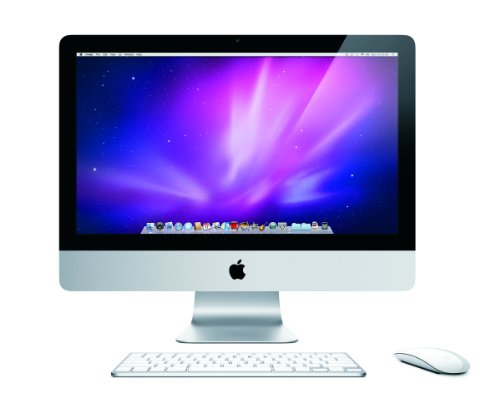
The ultimate all-in-one. Turbocharged. The new iMac is the ultimate all-in-one computer. Its Intel Core i3 processor feature an advanced architecture and set new benchmarks for iMac performance. And fast discrete graphics processors now come standard in every iMac. The 21.5-inch widescreen displays is perfect for HD video, and the Apple Wireless Keyboard and Magic Mouse keep your desktop tidy.
Offering a brilliant 21.5-inch LED-backlit widescreen display in an edge-to-edge glass design and seamless all aluminum enclosure, the Apple iMac is ideal for watching high definition movies and TV shows from iTunes, or editing and watching your own videos or photos using iLife. The iMac now also comes standard with a wireless keyboard and the Magic Mouse, which features Apple's Multi-Touch technology. And it's been updated with a faster, more powerful dual-core 3.06 GHz Intel Core i3 processor--with 4-way multitasking power that enables each core of the processor to work on two tasks at the same time.
The iMac's display offers a 1920 x 1080-pixel resolution (for native 1080p high-definition viewing), and it uses IPS technology to deliver consistent color across an ultra wide 178 degree viewing angle. This 21.5-inch model (MC508LL/A) also features improved graphics with ATI Radeon HD 4670 discrete graphics featuring 256 MB of GDDR3 memory and a 500 GB hard drive.
It comes pre-loaded with Apple's Mac OS X 10.6 Snow Leopard operating system--an operating system custom-designed for the advanced technology inside--and it also comes with the iLife suite of applications, including iPhoto, iMovie, Garageband, and iTunes.
Widescreen 21.5-inch iMac

The 21.5-inch iMac features a brilliant LED-backlit display with widescreen 16:9 aspect ratio.

Key Specifications

Apple iMac

The iMac declutters your desktop with a wireless keyboard and new Magic Mouse--the world's first Multi-Touch mouse..
  • 21.5-inch LED-backlit glossy widescreen display with IPS technology, a 1920 x 1080-pixel resolution, 16:9 aspect ratio, 330 cd/m2 brightness rating, and 178-degree viewing angle (horizontal and vertical)
  • 3.06 GHz Intel Core i3 dual-core processor for a fast, responsive PC experience (4 MB shared L3 cache). Intel's Hyper-Threading Technology enables each core of your processor to work on two tasks at the same time, delivering the performance you need for smart multitasking.
  • 500 GB Serial ATA hard drive (7200 RPM)
  • 4 GB installed RAM (1066 MHz DDR3; supports up to 16 GB)
  • ATI Radeon HD 4670 graphics processor (with 256 MB of DDR3 SDRAM shared with main memory) for an outstanding everyday graphics experience
  • 8x slot-loading SuperDrive with double-layer DVD support (DVD±R DL/DVD±RW/
  • Built-in iSight camera for video chatting
  • Wi-Fi wireless networking (based on 802.11n specification; 802.11a/b/g compatible)
  • Gigabit Ethernet wired networking (10/100/1000BASE-T)
  • Bluetooth 2.1 + EDR (Enhanced Data Rate) for connecting with peripherals such as keyboards, mice and cell phones
  • Side-loading SDXC card slot
  • Four USB 2.0 ports, one FireWire 800 port
  • Mini DisplayPort video output with optional adapters for DVI and VGA output
  • Built-in stereo speakers with two internal 17-watt high-efficiency amplifiers along with built-in microphone, optical digital audio output/headphone out, optical digital audio input/audio line in
  • Dimensions: 20.8 x 7.42 x 17.75 inches (WxDxH)
  • Weight: 20.5 pounds
  • Included Apple Wireless Keyboard and Magic Mouse
What's in the Box
What's in the Box
iMac, Apple Wireless Keyboard, Magic Mouse, cleaning cloth, power cord, install/restore DVDs, printed and electronic documentation
Limited Warranty And Service
The iMac comes with 90 days of free telephone support and a one-year limited warranty. Purchase the AppleCare Protection Plan to extend your service and support to three years from your computer's purchase date. Only the AppleCare Protection Plan provides you with direct telephone support from Apple technical experts and the assurance that repairs will be handled by Apple-authorized technicians using genuine Apple parts.

Key Features

iMac profile with DVD drive and SD card 
slot

The slot-loading 8x SuperDrive and SDXC card slot.
Big, Beautiful Display Combined with All-In-One Simplicity
The iMac has come a long way from the first 15-inch iMac. The all-in-one design of the first flat-panel iMac cleaned up the desktop, and put everything you need--display, processor, graphics card, hard drive, optical drive, memory, and more--inside one simple enclosure. New technology inside and out makes the new iMac a worthy addition to the all-in-one dynasty.
This 21.5-inch model features an edge-to-edge glass display that covers nearly the entire front of the enclosure. When all you see is the display, nothing gets between you and what's onscreen. Movies, TV shows, websites, photos--everything looks stunning on the new 16:9 widescreen iMac display. And the LED backlighting in the new iMac helps push more light through the pixels with remarkable brightness and efficiency. And because the LED backlight doesn't take up much space, the iMac enclosure stays thin--even with all the high-performance components inside.
The iMac display is designed to look great from almost any angle. A technology called in-plane switching (IPS) makes this possible. Whether you're sitting in front of the display or standing off to the side, you'll get a perfect picture with superb color consistency and no loss of detail.
The wider iMac display allows more room to separate the two hottest components, the CPU and the GPU. This keeps things cool inside the iMac enclosure. Apple engineers also implemented an intelligent control system that monitors temperatures and delivers just the right amount of airflow to critical components. And the three fans inside iMac have been tuned to be ultraquiet.
While you'll find a collection of ports on the back of iMac, you won't find much else. A seamless, precision-forged enclosure makes the back one continuous aluminum surface. And there's only one cord: the power cord.
Wireless Magic Mouse and Keyboard
Forget the mouse as you know it. Every iMac comes with the wireless Magic Mouse: the world's first Multi-Touch mouse. Use it once and you'll wonder how you ever used anything else. There's no scroll ball, no clunky wheel, no cord, and no visible button. Instead, the Magic Mouse uses Multi-Touch technology to let you control everything with simple gestures. Give them a try and you'll find that Magic Mouse changes the way you interact with your computer. Built-in software lets you configure Magic Mouse any way you want. Its smooth, seamless design is ambidextrous, and it supports two-button clicking--without buttons.
Magic Mouse
The iMac banishes desktop clutter completely with a wireless keyboard to go with the wireless Magic Mouse. This low-profile keyboard takes up less desk space--24 percent less--than larger keyboards. There's no numeric keypad, so you can place your mouse comfortably next to the keyboard. And built-in Bluetooth means there are no cables to connect.
Built-in Wi-Fi
High-speed 802.11n wireless technology is built into iMac. And with Time Capsule or the AirPort Express Base Station, every computer in every room can wirelessly connect to iMac, the Internet, and each other. Over this network, everyone can print, surf the web, and play music on iTunes through your home stereo--wirelessly.
iSight Webcam
Hidden behind the glass display at the top of iMac is an iSight camera. Use it with iChat, and you can be anywhere without actually being there. Video chat with up to three of your friends, share a video with a colleague, or present to a client. Use iSight with Photo Booth for fun photo effects. And there's no need to waste valuable primping time installing software or configuring the camera.

Pre-Loaded with Mac OS X Snow Leopard and iLife

Every Mac comes with Mac OS X Snow Leopard, the world's most advanced operating system, and iLife, Apple's innovative suite of applications for managing photos, making movies and creating and learning to play music. Snow Leopard builds on a decade of OS X innovation and success with hundreds of refinements, new core technologies and out of the box support for Microsoft Exchange. iLife features iPhoto, to easily organize and manage photos; iMovie with powerful easy-to-use new features such as Precision Editor, video stabilization and advanced drag and drop; and GarageBand which introduces a whole new way to help you learn to play piano and guitar.
Installed software
  • Mac OS X v10.6 Snow Leopard (includes Time Machine, Quick Look, Spaces, Spotlight, Dashboard, Mail, iChat, Safari, Address Book, QuickTime, iCal, DVD Player, Photo Booth, Front Row, Xcode Developer Tools)
  • iLife (includes iPhoto, iMovie, GarageBand, iWeb, iDVD)

Environmentally Friendly Design

Because Apple designs both hardware and software, we can reduce our environmental footprint in ways others can't. For starters, a highly efficient power supply reduces the amount of power wasted when bringing electricity from the wall to your Mac. Unlike a lot of PCs, a Mac uses energy-efficient hardware components that work hand in hand with the operating system to conserve power--even between keystrokes.
A Mac also doesn't contain a lot of toxic materials. All Mac displays are mercury and arsenic free, and the internal components are free of polyvinyl chloride (PVC) and brominated flame retardants (BFRs).
Efficient Power Supply
The iMac includes a highly efficient power supply that reduces the amount of power wasted when bringing electricity from the wall to your computer. Lower power consumption reduces energy bills and lessens the environmental impact of greenhouse gas emissions from power plants.
Advanced Power Management
Unlike a lot of Windows-based PC systems, iMac uses energy-efficient hardware components that work hand in hand with the operating system to conserve power. Mac OS X spins down hard drives and activates sleep mode on already energy-efficient LED-backlit displays. And it balances tasks across both central processors and graphics processors. Mac OS X never misses a power-saving opportunity, no matter how small. It even regulates the processor between keystrokes, reducing power between the letters you type. That's just one of many ways Apple manages small amounts of power that add up to big savings.
ENERGY STAR Qualification
The iMac meets the stringent low power requirements set by the EPA, making it ENERGY STAR qualified. ENERGY STAR 5.0 sets significantly higher efficiency limits for power supplies and aggressive limits for the computer's typical annual power consumption.

Technical Details

- 3.06GHz Intel Core i3
- 500GB Hard Drive, 4GB 1333MHz DDR3 SDRAM, DVD SuperDrive
- 21.5" LED-backlit display with a widescreen 16:9 aspect ratio, 1920x1080 HD resolution
- ATI Radeon HD 4670 with 256MB
- Mac OS X v10.6 Snow Leopard, Magic Mouse
See more technical details   

Customer Buzz 
5.0 out of 5 stars"No other desktop offers so much" 2010-08-20
By Rafael R C (Puerto la Cruz, Venezuela)
This review is intended for the 21.5 iMac mid-2010 model which came out recently. Apple made a significant improvement for the iMac line and it shows: 3.06GHz Intel Core i3 processor with 4MB level 3 cache; 4 GB of RAM upgradable to 8 GB; and also an ATI Radeon HD 4670 graphics processor with 256MB of GDDR3 memory. Look at last year's iMacs and you'll see that this is a very tempting offer despite the $1200 price tag.

Having said that, I don't think last year's iMac owners should rush to buy these new ones. However, if you haven't upgraded your desktop Mac in over a few years or you're looking to buy your first Mac desktop, this is one unbeatable deal you should not miss. 
Customer Buzz
5.0 out of 5 stars"love it!!!" 2010-08-11
By Zen Girl
love my new mac...it's fast of course. runs great. the wireless keyboard and mouse are fun. The magic mouse does take a little getting used to. To the guy who asked about a yellow tint; no yellow tint.
It's got a great screen but still takes up such a small amount of small on my desk.
The mac i've had for 7 years still runs great but I needed the intel processor so I can run Revit. I haven't run Bootcamp yet cause Amazon is taking a week and a half to get the copy of windows I ordered to me.
As if the machine it's self wasn't enough, the process of buying a copy of windows reminds me why I love macs so much! I needed a copy of XP but paying $150 for 8 year old software is ridiculous and trying to find a legitimate copy is hard. So I had to buy a copy of windows 7 PRO because the home edition doesn't support xp programs. go figure.

Addition: I got my copy of windows 7 and installed it with Boot Camp. MS for some reason makes their default monitor driver one that is incompatible with the iMac 21.5 monitor. The easiest fix for this is to boot up from the install disk and delete the default driver. windows will then use the next available driver which is compatible. Instructions on how to do this are available on the apple support website.

Customer Buzz 
5.0 out of 5 stars"Wow! The new iMac is way better then PC (Microsoft)" 2010-08-08
By VideoDude
I have own PCs (Microsoft Windows) since I was a little kid. I am amazed that with this new Mac I have downloaded many programs and the computer runs just as fast as it did when I first opened it! I can't believe that I am editing HD videos and the computer has never crashed. With Windows Vista my computer slowed down when I downloaded programs and it would crash randomly when editing HD video.

Cons:
For someone like me who is new to Mac it does take a few days to get used too. I had to watch videos online this week to understand all the features.

Pros:
Very quiet, Comes with a mouse that has "multi touch" (a cool feature), it doesn't slow down with programs added, doesn't crash, no viruses, I can play and edit HD video without any problems, It was easy to set up (only one plug to plug in), the screen is crystal clear, with bluetooth I can connect to my phone and both keyboard and mouse are bluetooth.

In Summery:
I personally will never go back to a Microsoft Windows PC. The iMac works perfectly and is easy to set up! It is well work the money because you don't have any problems like you do with PCs. I can't believe how well this computer performs!!!
Customer Buzz 
5.0 out of 5 stars"Best entry level mac EVER!" 2010-08-04
By superhans
*** This model has only been out for TWO weeks so the guy saying he has "owned it for 18 months" has a different model****

The NEW I3 intel processor is ridiculously fast compared to my older dual core imac (2.0ghz 3gb ) The value of the machine really speaks for itself. LED SCREEN!! The ram is upgradeable to 8gig and the new ATI video card is supposed to rock ;although, I have not really tested it out yet. Spend the extra 160$ to get the apple protection plan, especially on this newly updated one.


Electronics, Computers & Accessories